
How do I link GA4 to Google Ads?

Applies to: Google Analytics 4 (GA4) and Google Ads
Last updated: June 2026
Problem
You want to connect GA4 to Google Ads so you can share audience lists, import conversion events, and analyze advertising campaign performance across platforms.
Solution
GA4 allows you to link directly to one or more Google Ads accounts. This integration enables remarketing, automatic tagging, and shared reporting between the two platforms.
Step-by-Step Guide
1. Open the Admin Panel in GA4
- Go to https://analytics.google.com
- Select your GA4 property
- Click the gear icon in the lower-left to open Admin
2. Link to Google Ads
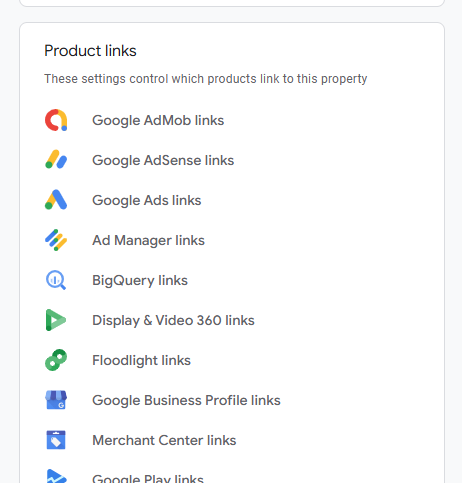
- Under the Product Links column, click Google Ads Links
- Click Link to begin setup
3. Select the Google Ads Account(s)
- Click Choose Google Ads accounts
- Check the box next to the account(s) you want to link
- Click Confirm
Note: You must have Admin access to the Google Ads account and Editor access to the GA4 property.
4. Configure Link Settings
- Choose whether to enable personalized advertising
- Choose whether to enable auto-tagging (recommended)
- Click Next, then Submit
5. Confirm and Review the Link
Once linked:
- GA4 can send audience data to Google Ads
- Google Ads conversions and cost data can appear in GA4 reports
- You’ll see Google Ads metrics in the Acquisition and Advertising sections of GA4
After Linking, You Can:
Import Conversions into Google Ads
- Go to Google Ads > Tools & Settings > Conversions
- Click New conversion action > Import
- Choose Google Analytics 4 properties
- Select the desired GA4 events to import (such as
purchase,form_submit)
Share GA4 Audiences with Google Ads
- Audiences created in GA4 will be available in Google Ads for remarketing
- Use these for targeting in Search, Display, and YouTube campaigns
Use GA4 Data in Google Ads Reports
- Analyze GA4 metrics such as engaged sessions and bounce rate directly within your Google Ads account
Notes
- You can link multiple Ads accounts to a single GA4 property
- You must have appropriate permissions in both platforms
- Audience membership may take time to populate, especially with smaller user bases
Analytics may change the location of menus.


